- Overview:
- Oracle 23ai database introduces a new feature to control whether a user or session is enabled for read-write operations, irrespective of the privileges of the user that is connected to the database.
- The READ_ONLY user only applies on a PDB local database user.
- The READ_ONLY session applies to any type of user for any type of container.
- With the capability to disable and re-enable the read-write capabilities of any user or session without revoking and re-granting privileges provides you with more flexibility to temporarily control the privileges of users or sessions for testing, administration, or application development purposes.
- It also gives you a simple way to control the read-write behavior within different parts of an application that are used by the same user or session.
- You can set the access of a local user to a PDB to READ ONLY or READ WRITE with the ALTER USER or CREATE USER statement.
- After READ ONLY access is enabled for a PDB user, whenever that user connects to the PDB, the session operates as if the database is open in read-only mode and the user cannot perform any write operation.
- A new column (READ_ONLY) has been added to dictionary views *_USERS to show if READ_ONLY is enabled/disabled for a database user.
In this blog, I'll demonstrate enable/disable READ ONLY for a PDB local database user.
Prerequisites:
- Oracle Database 23ai Free Developer Release.
- A pluggable database with HR database schema.
A Demo Steps:
1. Connect to a PDB using HR local database user and run a DML statement.
- Dictionary view *_USERS currently shows that READ_ONLY is disabled for HR user.

2. Connect to a PDB using SYSTEM common user and enable READ ONLY for HR user using below SQL command.
SQL> alter user &USERNAME read only;

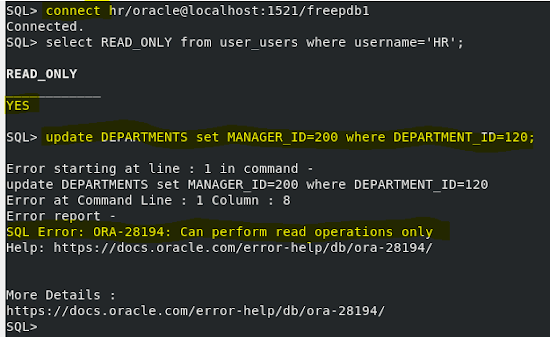
3. Reconnect to a PDB using HR local database user and run a DML statement.
- Dictionary view *_USERS currently shows that READ_ONLY is enabled for HR user.
- You will get below error message.
SQL Error: ORA-28194: Can perform read operations only
4. Using SYSTEM database session, disable READ ONLY for HR user using below SQL command.
SQL> alter user &USERNAME read write;

5. Reconnect to a PDB using HR local database user and run a DML statement. DML statement will run without error.
- Dictionary view *_USERS currently shows that READ_ONLY is disabled for HR user.


.png)


No comments:
Post a Comment